Random Item Picker - Pick Random Items from a List
Select up to 100,000 random items at once from multi-line lists with blank-line, duplicate, and separator controls.
Turn any comma-separated or single-line list into separate rows first with our Text Splitter.
🔒 Data Safety: We process everything securely and never store or share it.
How to Use
- Enter up to 100,000 items at once into the box above (one per line), or click "Sample".
- Set your desired pick count from 1 to 100,000 in the "Quantity to Pick" box below.
- Configure blank-line filtering, duplicate rules, and your output separator from the options below the input box.
- Click "Pick" to draw your random items, then copy or download your picked list.
Options Explained
- Quantity to Pick (1 - 100,000): Specify how many random items to draw from your filtered input pool.
- Remove Blank Items: Ignore empty or whitespace-only rows so blank lines never appear in your picks.
- Allow Duplicate Picks: Enable drawing with replacement so the same item can be picked more than once.
- Unique Input Items Only: Deduplicate repeated input rows before picking so every distinct item gets an equal chance.
- Separator: Format picked items with a newline, pipe, comma, semicolon, or space delimiter in the output box.
Key Features
- Pick from 1 to 100,000 random items at once out of any multi-line text list.
- Switch between non-repeating selection and drawing with replacement via Allow Duplicate Picks.
- Filter duplicate rows with Unique Input Items Only for equal odds, or keep repeated rows for weighted draws.
- Preserve exact leading and trailing spaces, UTF-8 characters, and emojis on every picked item without automatic trimming.
- Join picked items with a newline, pipe, comma, semicolon, or space delimiter for spreadsheets and lists.
- Select unbiased winners locally via Web Crypto CSPRNG (crypto.getRandomValues) with zero server data storage.
About This Online Random Item Picker
Our random item picker selects 1 to 100,000 items at once from any multi-line list in your browser. Each draw uses unbiased Web Crypto CSPRNG sampling alongside blank-line removal, duplicate controls, and custom output delimiters.
Developed and maintained by the PU Tools team, this tool gives you fast, accurate, safe, and easy results in just a few clicks.
Common Use Cases
- Giveaway and Contest Draws: Pick one or multiple winners fairly from participant lists while filtering out duplicate entries.
- Classroom and Team Task Rotation: Assign daily prompts, presentation topics, or review duties randomly across students and colleagues.
- Catalog and Dataset Spot Audits: Draw an unbiased subset of SKUs, URLs, or log rows for quality checks.
Example Input and Output
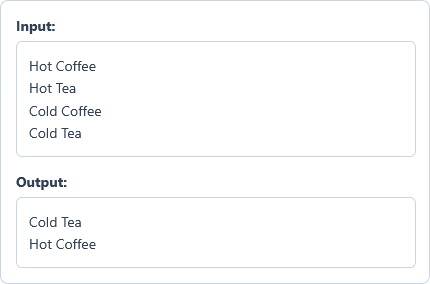
Example Input
Hot Coffee
Hot Tea
Cold Coffee
Cold Tea
Options used: Quantity to Pick (1 - 100,000): 2 | Remove Blank Items: ON | Allow Duplicate Picks: OFF | Unique Input Items Only: OFF | Separator: New Line
Example Output
Cold Tea
Hot Coffee
The picker draws two non-repeating items at random from the four-line list and separates them with a newline.
Frequently Asked Questions
How many items can I enter and pick at once?
You can enter and pick from 1 up to 100,000 items in a single draw. If your list exceeds 100,000 rows, split it into smaller batches before picking your items.
How do Allow Duplicate Picks and Unique Input Items Only differ?
Allow Duplicate Picks controls the output by letting the same item be drawn multiple times. Unique Input Items Only deduplicates your input list first, while leaving it off creates a weighted draw.
What happens to blank lines and spaces around my items?
When Remove Blank Items is enabled, empty or space-only lines are excluded from the picking pool. Every valid item keeps its exact leading and trailing spaces with zero automatic trimming.
Which output delimiters does the Separator option support?
You can separate picked items using a newline, pipe (|), comma (,), semicolon (;), or space. Select your preferred delimiter from the Separator dropdown and click Pick to format your random output.
Does this picker support international text, accented characters, and emojis?
Yes, the picker processes full UTF-8 strings across all languages, scripts, and emoji sequences. Multi-byte characters and symbols stay intact from your input box to the final picked output.
How does the tool guarantee a fair and unbiased random draw?
Each draw uses your browser's Web Crypto CSPRNG (crypto.getRandomValues) rather than standard Math.random(). It combines rejection sampling with a Partial Fisher-Yates shuffle so every item has equal probability.
Are my participant lists or picked winners stored on any server?
No, all list filtering and random selection run locally inside your web browser memory. We enforce zero server data storage, so your input items and results never leave your device.