Text Reverser - Reverse Line Order, Words, or Text
Reverse the line order, entire text, line characters, word order, or characters in each word.
🔒 Data Safety: We process everything securely and never store or share it.
How to Use
- Paste or type the text lines you want to reverse into the input box above.
- Select a Reverse Mode from the dropdown and toggle Skip Empty Lines or Trim Lines as needed.
- Check the live reversed line, word, and character counts, then copy or download the result below.
Options Explained
- Reverse Mode: Pick Reverse Line Order for rows, Reverse Entire Text, or Reverse Characters in Each Line. Select Reverse Word Order or Reverse Characters in Each Word to flip words or letters per line.
- Skip Empty Lines: Filters out blank rows before reversing so trailing empty lines never move to the top. Keep this box off to leave every empty or whitespace-only line in its reversed row position.
- Trim Lines: Cleans edge spaces, tabs, and non-breaking or full-width spaces from each row before flipping your text. Keep this box unchecked if you want to retain leading indentation or trailing spaces on your lines.
Key Features
- Reverse line order from bottom to top, the entire text, line characters, word order, or word characters.
- Reverse complete visible Unicode characters so multi-byte emojis, country flags, and accented letters stay intact.
- Preserve exact internal spaces, tabs, and non-breaking spaces when flipping word order or word letters.
- Detect international word boundaries in CJK, Thai, Lao, and Khmer scripts that do not use spaces.
- Filter out blank rows before flipping or clean unwanted edge spaces, tabs, and Unicode whitespace.
- Track reversed line, word, and character totals on the live summary bar with 100% client-side processing.
About This Online Text Reverser
The text reverser is a browser-based utility that flips line order, full text, words, or characters. It detects complete Unicode characters and word boundaries to keep multi-byte emojis, Asian scripts, and spacing intact.
Developed and maintained by the PU Tools team, this tool gives you fast, accurate, safe, and easy results in just a few clicks.
Common Use Cases
- Chronological Log Inversion: Flip server, application, or chat logs from bottom to top to read newest entries first.
- Palindrome and Coding: Reverse characters across lines or words to test palindrome strings, mirror text, and string algorithms.
- List Order Reversal: Invert ranked lists, CSV rows, or word sequences while keeping internal spacing and emojis intact.
Example Input and Output
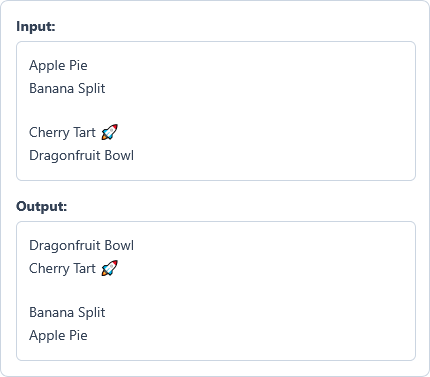
Example Input
Apple Pie
Banana Split

Cherry Tart 🚀
Dragonfruit Bowl
Options used: Reverse Mode: Reverse Line Order | Skip Empty Lines: OFF | Trim Lines: OFF
Example Output
Dragonfruit Bowl
Cherry Tart 🚀

Banana Split
Apple Pie
The reverser flips all five rows from bottom to top and keeps the blank line and emoji intact.
Frequently Asked Questions
How do I reverse the order of lines from bottom to top without flipping letters?
Select Reverse Line Order in the Reverse Mode dropdown menu below the input box. It flips the vertical row sequence from bottom to top while keeping every line's text intact.
What is the difference between Reverse Entire Text and Reverse Characters in Each Line?
Reverse Entire Text flips both the vertical line order and the characters inside every line. Reverse Characters in Each Line flips letters inside each row while keeping the original line order.
How can I reverse the letters inside each word while keeping word order intact?
Choose Reverse Characters in Each Word from the Reverse Mode dropdown menu. The tool flips characters inside each standalone word while keeping word order, spaces, and tabs unchanged.
Why do emojis, flags, and accented letters stay intact when I reverse characters?
Our reverser groups each visible letter or emoji as a single unit before flipping your text. This keeps family emojis, country flags, skin tones, and accented characters whole instead of scrambling their bytes.
How do I prevent trailing blank lines from moving to the top when reversing lines?
Check the Skip Empty Lines option before reversing your list or log rows. It removes blank and whitespace-only rows so trailing empty lines never jump to the first row.
Does this text reverser transmit or store my lines on a remote server?
No, your browser flips all lines, words, and characters directly on your own device. We never transmit or store your text anywhere, so private logs and lists stay completely confidential.