Line Counter - Count Lines and Line Length Stats
Count total, non-empty, empty, whitespace-only, unique, and duplicate lines with line length statistics in your text.
🔒 Data Safety: We process everything securely and never store or share it.
How to Use
- Paste or type your multiline text into the input box above to count lines instantly.
- Toggle the options below to filter whitespace-only lines, set duplicate case rules, or switch length units.
- Review the live summary bar above, or copy and download the complete line report below.
Options Explained
- Ignore Whitespace-Only Lines: Counts lines containing only spaces or tabs as empty lines and excludes them from length calculations.
- Case-Sensitive Duplicates: Treats uppercase and lowercase variations as distinct lines when counting unique and duplicate entries. Uncheck this box to group identical lines together regardless of uppercase or lowercase letters.
- Length Unit: Measures shortest, longest, and average line lengths in visible Unicode characters (Characters) or raw storage size (UTF-8 Bytes).
Key Features
- Count total, non-empty, empty, and whitespace-only lines across multiline text of any length.
- Identify unique and duplicate line counts using case-sensitive or case-insensitive matching rules.
- Pinpoint the exact line number (#N) for both the longest line and shortest non-empty line.
- Switch line length measurements between visible Unicode characters (including emojis) and raw UTF-8 byte sizes.
- Detect Windows, Unix, and Mac line breaks accurately without creating extra blank lines.
- Calculate line counts, duplicate totals, and length metrics locally on your device without storing any data.
About This Online Line Counter
The line counter is a client-side text tool that measures line counts, duplicate lines, and line lengths. It separates content, empty, and whitespace-only lines while tracking unique entries and character or UTF-8 byte lengths.
Developed and maintained by the PU Tools team, this tool gives you fast, accurate, safe, and easy results in just a few clicks.
Common Use Cases
- Source Code and Log Checks: Locate the exact line number of the longest line to enforce 80- or 120-character column limits.
- Dataset and List Verification: Check total row counts, blank lines, and duplicate records before importing lists into spreadsheets or databases.
- Database Byte Size Limits: Switch to UTF-8 Bytes mode to verify that individual lines stay within strict database byte limits.
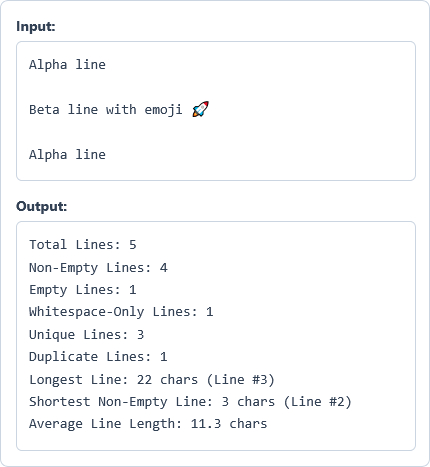
Example Input and Output
Example Input
Alpha line

Beta line with emoji 🚀

Alpha line
Options used: Ignore Whitespace-Only Lines: OFF | Case-Sensitive Duplicates: ON | Length Unit: Characters (Unicode)
Example Output
Total Lines: 5
Non-Empty Lines: 4
Empty Lines: 1
Whitespace-Only Lines: 1
Unique Lines: 3
Duplicate Lines: 1
Longest Line: 22 chars (Line #3)
Shortest Non-Empty Line: 3 chars (Line #2)
Average Line Length: 11.3 chars
The counter finds five total lines, one empty line, one duplicate, and a 22-character longest line.
Frequently Asked Questions
What is the difference between empty lines and whitespace-only lines?
Empty lines have no characters at all between two consecutive line breaks. Whitespace-only lines contain invisible spaces or tabs, which you can count as empty by enabling Ignore Whitespace-Only Lines.
How does the tool count unique and duplicate lines?
The counter compares all non-empty lines to report how many distinct lines and repeated copies exist. Blank lines are excluded so spacing between paragraphs never increases your duplicate count.
When should I switch Length Unit from Characters to UTF-8 Bytes?
Use Characters (Unicode) to count visible letters, symbols, and emojis for writing or code column limits. Switch to UTF-8 Bytes when checking database column limits, CSV imports, or storage size limits.
Does this counter add line numbers to my text?
No, this tool calculates line counts and length statistics without modifying your original text. It only reports the line number (#N) of the longest line and shortest non-empty line.
Is there a maximum number of lines I can count at once?
No, the counter does not set a fixed line limit on your input text. The tool processes hundreds of thousands of lines directly in your browser without freezing the page.
Does this line counter send or save my text on any server?
No, all line counting, duplicate checks, and length measurements happen locally inside your web browser. Your multiline text remains private on your device and never leaves your computer or phone.