Prefix and Suffix Adder - Add Text to Text Lines
Add a custom prefix, suffix, or sequential numbers to each line, word, sentence, or paragraph.
Need to strip existing prefixes or suffixes instead? Try our Prefix and Suffix Remover.
🔒 Data Safety: We process everything securely and never store or share it.
How to Use
- Paste or type the text you want to modify into the input box above.
- Enter your prefix or suffix, select a target unit in Add To, and set your options.
- Check the live modified count, then copy or download the updated text from the result box.
Options Explained
- Prefix: Enter the text or escape sequence (\t, \n, \r, \\) to insert before each target item. Leave this box empty when you only want to add a suffix or item numbers.
- Suffix: Specify the text or escape sequence (\t, \n, \r, \\) to append after each target item. Leave this field blank to modify only the start of your lines, words, sentences, or paragraphs.
- Add To: Select Each Line to modify rows, or choose Each Word, Each Sentence, or Each Paragraph. This setting controls whether your prefix, suffix, and numbers wrap lines, words, sentences, or paragraph blocks.
- Skip Empty Lines: Leaves blank and whitespace-only lines untouched in their original row positions in Each Line mode. This option disables automatically when you switch Add To to words, sentences, or paragraphs.
- Trim Lines: Strips leading and trailing spaces, tabs, and Unicode whitespace from each line before adding text. Leave this option unchecked to preserve all original edge indentation on your lines.
- Number Items (1. 2. 3.): Prepends sequential numbers (1., 2., 3.) before the prefix on every modified line, word, sentence, or paragraph. In Each Line mode with Skip Empty Lines active, the counter numbers only non-empty rows.
Key Features
- Add custom prefixes, suffixes, or both to every line, word, sentence, or paragraph in your text.
- Insert tab characters (\t), line breaks (\n), carriage returns (\r), and literal backslashes (\\) via escape sequences.
- Preserve blank lines in their original row positions or attach prefixes and suffixes to empty lines.
- Strip leading and trailing spaces, tabs, non-breaking spaces, and CJK spaces before wrapping each line.
- Prepend sequential numbers (1., 2., 3.) to modified lines, words, sentences, or multi-line paragraph blocks.
- Count modified items and total lines live in browser memory with zero server data storage.
About This Online Prefix and Suffix Adder
The prefix and suffix adder is a client-side utility that adds text to lines, words, sentences, or paragraphs. It supports sequential numbering, escape sequences, international sentence segmentation, Unicode line trimming, and empty-line skipping.
Developed and maintained by the PU Tools team, this tool gives you fast, accurate, safe, and easy results in just a few clicks.
Common Use Cases
- SQL and Code Array Formatting: Wrap multiline values in single or double quotes and append trailing commas for SQL queries or arrays.
- Keyword and Hashtag Prefixing: Select Each Word mode to prepend hashtags (#), mentions (@), or match brackets around space-separated keywords.
- HTML List and Paragraph Wrapping: Add <li> and </li> tags to each line or wrap multi-line blocks in <p> and </p> tags.
Example Input and Output
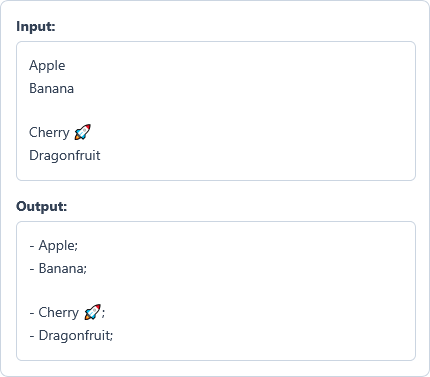
Example Input
Apple
Banana

Cherry 🚀
Dragonfruit
Options used: Prefix: "- " | Suffix: ";" | Add To: Each Line | Skip Empty Lines: ON | Trim Lines: OFF | Number Items (1. 2. 3.): OFF
Example Output
- Apple;
- Banana;

- Cherry 🚀;
- Dragonfruit;
The tool adds the prefix and suffix to four non-empty lines while keeping the blank line and emoji.
Frequently Asked Questions
How do I add a prefix or suffix to each word instead of each line?
Select Each Word in the Add To dropdown menu above before entering your prefix or suffix. The tool wraps every standalone word while keeping all spaces, tabs, and line breaks intact.
How can I wrap multi-line paragraphs without modifying every individual line inside them?
Choose Each Paragraph in the Add To menu to group consecutive non-empty lines into blocks. Your prefix and suffix attach only to the start and end of each paragraph block.
How do I insert a tab character or a line break in my prefix or suffix?
Type \t in the Prefix or Suffix box to insert a tab, or \n for a line break. You can also enter \\ whenever you need to add a literal backslash character.
Why does the Skip Empty Lines checkbox disable in word, sentence, and paragraph modes?
Word and sentence modes automatically ignore blank spaces, while paragraph mode uses blank lines as block separators. Skip Empty Lines applies only in Each Line mode where blank rows can be wrapped.
How does the Each Sentence mode handle international punctuation and abbreviations?
It uses browser-native Unicode sentence segmentation to detect Latin, CJK, Arabic, and Indic sentence endings accurately. This prevents common abbreviations from splitting prematurely and keeps spaces between sentences outside your suffix.
Are my text lines stored or sent to any server when I add prefixes or suffixes?
No, all prefix, suffix, and numbering operations run locally inside your web browser memory. Your input text and modified output never leave your device because we use zero server storage.