Leading and Trailing Spaces Remover - Trim Text Lines
Strip leading and trailing spaces, tabs, and Unicode spaces from each line while merging or removing empty lines.
Want to collapse extra spaces and tabs between words too? Try our Whitespace Remover.
🔒 Data Safety: We process everything securely and never store or share it.
How to Use
- Enter or paste the text lines with unwanted edge spaces into the input box above.
- Select a trim mode, set the empty-line filter, and check which whitespace types to remove.
- Check the live leading and trailing removal counts, then copy or download your trimmed text.
Options Explained
- Trim Mode: Select Both Leading & Trailing to strip whitespace from both ends of every line. Choose Leading Spaces Only (Left) or Trailing Spaces Only (Right) to clean just one side.
- Empty Lines: Choose Keep Empty Lines to preserve all blank lines in their original positions. Select Merge Empty Lines to collapse consecutive blank lines, or Remove Empty Lines to delete them.
- Spaces: Removes standard spaces from the start, end, or both sides of each line. Uncheck this box to keep regular space indentation while stripping edge tabs or Unicode spaces.
- Tabs: Strips horizontal tab characters from the selected edges of each text line. Uncheck this option to preserve tab indentation or keep empty edge columns in tab-separated lists.
- Unicode Spaces: Removes non-breaking spaces, full-width CJK spaces, narrow spaces, and byte order marks from line edges. Uncheck this box if your text needs intentional non-breaking or full-width spaces at line ends.
Key Features
- Trim whitespace from both line ends, only the leading left side, or only the trailing right side.
- Preserve all internal spaces, column alignments, and inline tab characters between words inside every line.
- Toggle standard spaces, tabs, and Unicode spaces including non-breaking spaces, CJK spaces, and byte order marks.
- Keep original line positions, merge consecutive blank lines into one, or remove all empty lines.
- Convert Windows CRLF, Unix LF, and Mac CR line breaks while keeping multilingual UTF-8 text and emojis.
- Display separate leading and trailing removal counts with total lines locally using zero server data storage.
About This Online Leading and Trailing Spaces Remover
The leading and trailing spaces remover is a client-side utility that strips unwanted whitespace from line edges. It offers directional trim modes, whitespace type toggles, and empty-line filters while keeping internal spacing intact.
Developed and maintained by the PU Tools team, this tool gives you fast, accurate, safe, and easy results in just a few clicks.
Common Use Cases
- CSV Record Trimming: Strip hidden leading or trailing spaces from exported rows so lookups and sorting match accurately.
- Source Code Cleanup: Select Trailing Spaces Only mode to strip stray spaces and tabs while keeping code indentation.
- Multilingual Text Trimming: Remove non-breaking spaces, full-width CJK spaces, and byte order marks from web or document text.
Example Input and Output
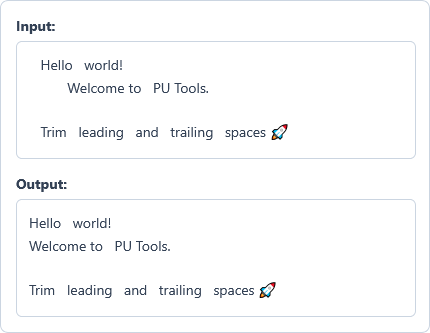
Example Input
   Hello   world!
	  Welcome to   PU Tools.

   Trim   leading   and   trailing   spaces 🚀
Options used: Trim Mode: Both Leading & Trailing | Empty Lines: Keep Empty Lines | Spaces: ON | Tabs: ON | Unicode Spaces: ON
Example Output
Hello   world!
Welcome to   PU Tools.

Trim   leading   and   trailing   spaces 🚀
The tool strips edge spaces and tabs while preserving internal spaces, the blank line, and the emoji.
Frequently Asked Questions
How do I remove only trailing spaces while keeping leading indentation on each line?
Select Trailing Spaces Only (Right) in the Trim Mode dropdown menu above. The tool strips spaces and tabs from the right end while leaving left indentation intact.
Does this tool remove repeated spaces or tabs between words inside a line?
No, this remover only strips whitespace from the start and end of each line. All internal spaces and tabs between words remain untouched unless you use our Whitespace Remover.
How can I trim leading and trailing spaces without removing tab characters in TSV data?
Uncheck the Tabs checkbox while keeping the Spaces option enabled in the settings above. This strips unwanted edge spaces from each row while preserving leading or trailing tab delimiters.
How do Keep Empty Lines, Merge Empty Lines, and Remove Empty Lines handle blank lines?
Lines containing only spaces become blank after trimming, and Keep Empty Lines preserves their exact row positions. Merge Empty Lines collapses consecutive blank lines into one, while Remove Empty Lines deletes them completely.
Which international whitespace characters does the Unicode Spaces option remove from line edges?
It removes non-breaking spaces, full-width CJK spaces, thin or hair spaces, and byte order marks. All accented letters, non-Latin scripts, and emojis on your lines remain completely untouched during trimming.
Are my text lines stored or sent to a server when I trim spaces?
No, all line trimming and empty-line filtering run locally inside your browser memory. Your text never leaves your device because this tool operates with zero server data storage.