Prefix and Suffix Remover - Remove Text from Lines
Remove a prefix, suffix, escape sequence, or regular expression from each line, word, sentence, or paragraph.
Need to attach prefixes, suffixes, or item numbers instead? Try our Prefix and Suffix Adder.
🔒 Data Safety: We process everything securely and never store or share it.
How to Use
- Paste or type the text you want to clean into the input box above.
- Enter the prefix or suffix to strip, choose Remove From and Match Mode, and set your options.
- Review the live removal summary, then copy or download the cleaned text from the result box.
Options Explained
- Prefix: Enter literal text, escape sequences (\t, \n, \r, \\), or a RegEx pattern anchored to each item start. Leave this field blank when you only want to remove suffixes from your text.
- Suffix: Specify literal text, escape sequences (\t, \n, \r, \\), or a RegEx pattern anchored to each item end. Leave this box empty when you only need to strip prefixes from each target unit.
- Remove From: Choose Each Line to strip line edges while keeping every row in its exact original position. Select Each Word, Each Sentence for multilingual sentences, or Each Paragraph for multi-line paragraph blocks.
- Match Mode: Select Literal Text to match exact characters and escape sequences (\t, \n, \r, \\) without special regex rules. Choose Regular Expression (RegEx) to match raw patterns or /pattern/flags for variable numbering or timestamps.
- Case-Insensitive: Matches uppercase and lowercase characters interchangeably, including accented Unicode letters, across both matching modes. Leave this checkbox unchecked when your prefix or suffix requires strict case-sensitive character matching.
- Trim Lines: Removes leading and trailing spaces, tabs, and Unicode whitespace before checking lines for prefixes or suffixes. It also strips any remaining edge spaces left behind after removing your matched prefix or suffix.
Key Features
- Strip custom prefixes, suffixes, or both from each line, word, sentence, or paragraph in your text.
- Match literal strings, escape sequences (\t, \n, \r, \\), or edge-anchored regular expressions and /pattern/flags patterns.
- Preserve exact 1:1 row positions in Each Line mode, including blank lines and emptied rows.
- Support case-insensitive matching across ASCII and accented Unicode characters in both Literal Text and RegEx modes.
- Trim leading and trailing spaces, tabs, and Unicode whitespace before and after stripping matched edges.
- Display modified items plus removed prefixes and suffixes live in browser memory with zero server data storage.
About This Online Prefix and Suffix Remover
The prefix and suffix remover is a browser-based utility that strips text from lines, words, sentences, or paragraphs. It handles literal strings, escape sequences, edge-anchored regular expressions, multilingual sentence boundaries, and Unicode line trimming.
Developed and maintained by the PU Tools team, this tool gives you fast, accurate, safe, and easy results in just a few clicks.
Common Use Cases
- Numbered and Bullet List Cleaning: Strip variable list numbers (1., 2., 3.), leading hyphens (-), or bullet symbols from pasted outlines.
- Code and CSV Unwrapping: Remove surrounding single or double quotes along with trailing commas or semicolons from data rows.
- Tag and Hashtag Stripping: Delete leading hashtags (#) or mentions (@) from words and strip <p> and </p> tags from paragraphs.
Example Input and Output
Example Input
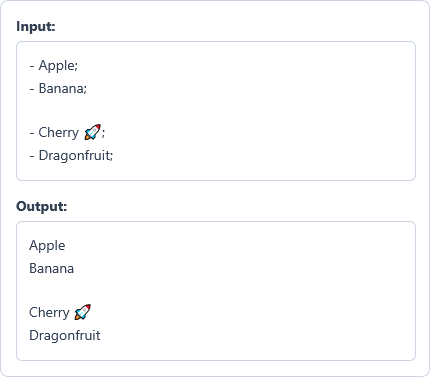
- Apple;
- Banana;

- Cherry 🚀;
- Dragonfruit;
Options used: Prefix: "- " | Suffix: ";" | Remove From: Each Line | Match Mode: Literal Text | Case-Insensitive: OFF | Trim Lines: OFF
Example Output
Apple
Banana

Cherry 🚀
Dragonfruit
The tool strips the prefix and suffix from four items while preserving the blank row and emoji.
Frequently Asked Questions
How do I remove variable line numbers like 1., 2., and 10. from a list?
Select Regular Expression (RegEx) in Match Mode and enter \d+\.\s* into the Prefix box. The tool automatically anchors your pattern to each line start without deleting numbers inside sentences.
How can I strip hashtags or quotes from each word instead of each line?
Choose Each Word in the Remove From dropdown menu before entering your prefix or suffix. It strips matched characters from every standalone word while keeping spaces, tabs, and line breaks.
How do I remove tab characters or line breaks from item edges?
Type \t for tabs or \n for line breaks into Prefix or Suffix in Literal Text mode. Enter a double backslash (\\) whenever you want to strip a literal backslash from item edges.
Why should I enable Trim Lines when removing a prefix or suffix?
Hidden spaces or tabs at line ends can prevent an exact prefix or suffix match. Trim Lines strips edge whitespace before matching and cleans any remaining edge spaces afterward.
How does Each Sentence mode remove suffixes attached after sentence punctuation?
It segments Latin, CJK, Arabic, and Indic sentences and detects custom suffixes attached after ending punctuation. This lets you strip trailing semicolons, quotes, or brackets from sentences without breaking multi-sentence lines.
Are my text lines stored or sent to any server when I strip prefixes or suffixes?
No, all text and regular expression removal operations run locally inside your browser memory. Your raw text, patterns, and cleaned results stay on your device with zero server storage.