Bulk Base64 Encoder - Encode Multiple Lines
Encode up to 100,000 plain text lines at once into UTF-8 Base64 strings with 1:1 row order.
To break a single-line string into individual rows first, open our Text Splitter before encoding.
🔒 Data Safety: We process everything securely and never store or share it.
How to Use
- Paste your plain text lines into the input box above (one per row), or click "Sample".
- Toggle the URL-safe or padding options below the input box to match your target format.
- Click "Encode" to convert every line into its corresponding Base64 string at once.
- Click "Copy" or "Download" above the result box to export your encoded Base64 list.
Options Explained
- URL-Safe (- and _): Replace + and / with - and _ symbols (RFC 4648) on each row.
- Omit Padding (=): Strip trailing = padding characters from each Base64 row to create compact URL strings.
Key Features
- Batch encode up to 100,000 plain text lines into Base64 strings with a live line counter.
- Maintain strict 1:1 row order and leave blank rows empty so output aligns with spreadsheet columns.
- Preserve leading and trailing spaces on non-empty lines without trimming or altering your raw text.
- Generate RFC 4648 URL-safe Base64 (- and _) and strip trailing = padding across every row at once.
- Encode accented letters, non-Latin alphabets, and emojis per line using multi-byte UTF-8 byte arrays.
- Process your entire list locally inside browser memory with zero network transfers or server storage.
About This Online Bulk Base64 Encoder
This bulk Base64 encoder converts up to 100,000 text lines into RFC 4648 Base64 strings in your browser. It encodes each row in UTF-8, keeps blank rows for 1:1 alignment, and supports URL-safe output.
Developed and maintained by the PU Tools team, this tool gives you fast, accurate, safe, and easy results in just a few clicks.
Common Use Cases
- HTTP Basic Auth Lists: Encode username:password pairs line by line to generate Basic Authentication tokens for API suites.
- Spreadsheet Columns: Convert a column of text IDs, emails, or JSON snippets into Base64 in exact row order.
- URL Token Fixtures: Create batches of URL-safe Base64 strings without padding for query parameters and routing keys.
Example Input and Output
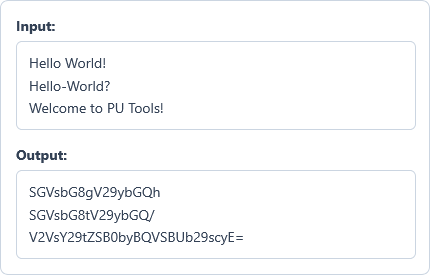
Example Input
Hello World!
Hello-World?
Welcome to PU Tools!
Options used: URL-Safe (- and _): OFF | Omit Padding (=): OFF
Example Output
SGVsbG8gV29ybGQh
SGVsbG8tV29ybGQ/
V2VsY29tZSB0byBQVSBUb29scyE=
The encoder converts each text row into its RFC 4648 Base64 string while preserving exact 1:1 row order.
Frequently Asked Questions
How many plain text lines can I encode in one batch?
You can encode up to 100,000 plain text lines in a single operation. If your dataset exceeds 100,000 rows, split it into smaller batches before encoding.
What is the difference between this tool and the single Base64 Encoder?
This bulk encoder treats every line as an independent item and outputs one Base64 string per row. In contrast, the standard Base64 Encoder combines multi-line text, including line breaks, into one continuous Base64 string.
How does the encoder handle blank rows and leading or trailing spaces?
Blank rows stay empty in the output so your row numbers match your original spreadsheet 1:1. Non-empty lines keep all leading, trailing, and space-only characters without trimming before encoding.
Why is there no 76-character MIME line wrap option in this bulk tool?
Wrapping Base64 strings at 76 characters adds extra line breaks and breaks 1:1 row alignment. For 76-character RFC 2045 MIME wrapping on a single payload, use our standard Base64 Encoder.
When should I use URL-Safe (- and _) and Omit Padding (=) for batch lists?
Enable both options when generating batches of URL query tokens, routing IDs, or JWT segments. Replacing + and / with - and _ and stripping = prevents URL parsing errors.
Does this bulk encoder support non-Latin characters and emojis on each line?
Yes, every row is converted into a UTF-8 byte array before Base64 encoding begins. This ensures accurate output for accented letters, CJK, Arabic, Cyrillic scripts, and emojis.
Are my text lists sent or stored on any external server?
No, all batch encoding runs locally inside your web browser memory on your device. Your plain text lists and encoded Base64 strings never leave your computer or phone.