Base64 Decoder - Convert Base64 to Plain Text
Decode standard, multi-line, and URL-safe Base64 strings into a single plain text result with automatic Data URI extraction.
For a list of separate Base64 lines, use our Bulk Base64 Decoder to decode each line.
🔒 Data Safety: We process everything securely and never store or share it.
How to Use
- Enter or paste your Base64 string into the input box above, or click "Sample" for an example.
- Check Strict Mode or Auto-Detect Data URI below the input box to set your decoding rules.
- Click "Decode" to merge any line breaks and convert the Base64 payload into plain text.
- Click "Copy" or "Download" above the result box to get your decoded text output.
Options Explained
- Strict Mode: Require exact Base64 characters and valid UTF-8 or UTF-16 bytes while blocking unreadable control characters.
- Auto-Detect Data URI: Strip text Data URI headers (like data:text/plain;base64,) before decoding and block binary Data URIs (enabled by default).
Key Features
- Merge multi-line Base64 chunks and 76-character MIME strings into one continuous text output.
- Decode URL-safe Base64 symbols (- and _) and append missing = padding characters automatically.
- Extract and decode text Data URIs (plain text, JSON, XML, SVG, CSV, and YAML) while blocking binary formats.
- Restore accented letters, CJK scripts, Arabic text, and emojis with UTF-8 and UTF-16 BOM decoding.
- Provide optional Strict Mode to reject malformed Base64 syntax and unreadable control characters.
- Process all strings locally in your browser memory with zero server data storage.
About This Online Base64 Decoder
This Base64 decoder converts standard and URL-safe Base64 strings back into readable plain text directly in your browser. It joins multi-line Base64 blocks, restores missing padding, and decodes UTF-8 or UTF-16 byte sequences into original text.
Developed and maintained by the PU Tools team, this tool gives you fast, accurate, safe, and easy results in just a few clicks.
Common Use Cases
- API and Web Debugging: Decode Base64-encoded JSON payloads, Basic Auth headers, and URL-safe query parameters.
- Email and MIME Inspection: Convert multi-line MIME message bodies and encoded email text back into plain text.
- Data URI and Config Extraction: Read embedded text, XML, SVG code, and configuration strings from web source code.
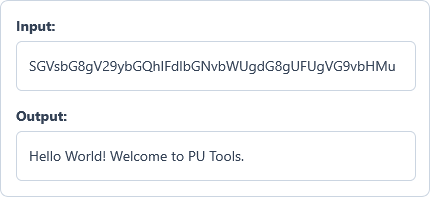
Example Input and Output
Example Input
SGVsbG8gV29ybGQhIFdlbGNvbWUgdG8gUFUgVG9vbHMu
Options used: Strict Mode: OFF | Auto-Detect Data URI: ON
Example Output
Hello World! Welcome to PU Tools.
The tool decodes the Base64 string back into its original UTF-8 plain text.
Frequently Asked Questions
When should I use this decoder instead of the Bulk Base64 Decoder?
Use this decoder when your input is one Base64 string or a multi-line MIME block. If you have a list of independent Base64 rows, use the Bulk Base64 Decoder instead.
Does it support URL-safe Base64 and missing padding?
Yes. The decoder converts URL-safe symbols (- and _) into + and / and restores missing = padding automatically.
How does Strict Mode check my Base64 string?
Strict Mode rejects spaces, invalid Base64 characters, malformed UTF-8 or UTF-16 bytes, and unreadable control characters. Leave it unchecked if your string contains extra spaces or tabs.
Can this tool decode text from Data URIs?
Yes. When Auto-Detect Data URI is on, it strips headers to decode text, JSON, XML, or SVG. Binary Data URIs such as images and audio streams are blocked.
How does the decoder handle UTF-8, UTF-16, and emojis?
It detects UTF-16 byte order marks (LE and BE) and decodes UTF-8 byte streams directly in your browser. This keeps accented letters, CJK scripts, Arabic text, and emojis intact.
Does this Base64 decoder send my data over the network?
No. Every decoding step runs locally in your browser memory with zero server data storage. Your Base64 payloads and plain text results stay on your device.
What happens if I enter an empty Base64 string?
An empty input is valid and decodes cleanly into an empty result without errors.