List Shuffler - Randomize List and Line Order
Randomize the order of up to 100,000 items at once with empty-line, duplicate, trim, and separator options.
Draw a specific number of random winners from your list instead with our Random Item Picker.
🔒 Data Safety: We process everything securely and never store or share it.
How to Use
- Paste or type up to 100,000 items in a single batch into the input box above.
- Check Skip Empty Lines, Remove Duplicates, or Trim Lines below to clean your list before shuffling.
- Select your preferred output delimiter from the Separator dropdown menu to format the randomized items.
- Click "Shuffle" to randomize the item order, then copy or download your shuffled list.
Options Explained
- Skip Empty Lines: Exclude blank or whitespace-only rows from your list before shuffling the remaining items. Leave this option unchecked to keep every empty row and preserve a strict 1:1 line count.
- Remove Duplicates: Filter out repeated rows with case-sensitive matching (including accented letters) so each unique item appears once. Leave this box unchecked if you want duplicate entries to remain in your shuffled list.
- Trim Lines: Strip leading and trailing spaces, tabs, and non-breaking or full-width spaces from every line first. Trimming runs before empty-line and duplicate checks, or stays off to preserve exact line indentation.
- Separator: Join your shuffled items with a newline, pipe, comma, semicolon, or space output delimiter. Use New Line for multi-row lists, or pick an inline delimiter for compact single-line strings.
Key Features
- Shuffle up to 100,000 list items or text lines in one run with default 1:1 row preservation.
- Run an unbiased Fisher-Yates shuffle powered by Web Crypto CSPRNG (crypto.getRandomValues) and 32-bit rejection sampling.
- Filter out blank rows and remove duplicate entries so every distinct item appears only once.
- Trim leading and trailing spaces, tabs, and non-breaking or full-width spaces, or keep raw spacing intact.
- Process full UTF-8 strings across international scripts, accented letters, and multi-byte emojis without character corruption.
- Format shuffled items with newline, pipe, comma, semicolon, or space delimiters using zero server data storage.
About This Online List Shuffler
This list shuffler randomizes the order of up to 100,000 lines in a single shuffle. It combines unbiased Fisher-Yates shuffling and Web Crypto CSPRNG with empty-line, duplicate, trim, and delimiter options.
Developed and maintained by the PU Tools team, this tool gives you fast, accurate, safe, and easy results in just a few clicks.
Common Use Cases
- Tournament and Draft Order: Randomize player seeds, speaker schedules, or draft rosters to assign fair starting positions.
- Survey and Playlist Shuffling: Scramble exam questions, flashcard decks, or media playlists to prevent predictable order bias.
- Dataset and Spreadsheet Rows: Reorder CSV lines, training samples, or test records before splitting data into validation sets.
Example Input and Output
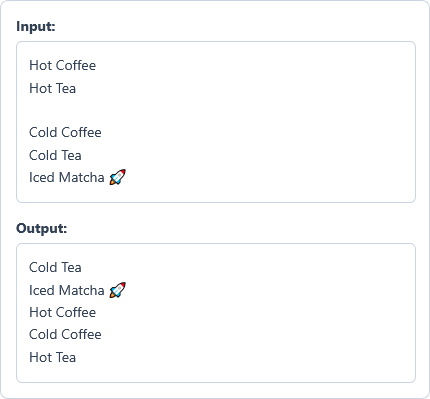
Example Input
Hot Coffee
Hot Tea

Cold Coffee
Cold Tea
Iced Matcha 🚀
Options used: Skip Empty Lines: ON | Remove Duplicates: OFF | Trim Lines: OFF | Separator: New Line
Example Output
Cold Tea
Iced Matcha 🚀
Hot Coffee
Cold Coffee
Hot Tea
The shuffler skips the blank row and randomizes the five remaining items onto separate lines.
Frequently Asked Questions
How many list items or text lines can I shuffle in one batch?
You can randomize from 1 up to 100,000 list items or lines in a single shuffle. If your dataset exceeds 100,000 rows, split it into smaller batches before running the tool.
What happens to blank lines in my list when I shuffle?
By default, the shuffler keeps every empty row to maintain a strict 1:1 spreadsheet line count. Check Skip Empty Lines to remove blank and whitespace-only rows before randomizing your list.
How do Remove Duplicates and Trim Lines work together before shuffling?
When both options are checked, Trim Lines strips edge spaces and tabs from every row first. Remove Duplicates then compares the cleaned lines with case-sensitive matching so padded duplicates are removed.
Which output delimiters can I use to join my shuffled items?
You can join shuffled items with a New Line, Pipe (|), Comma (,), Semicolon (;), or Space. Choose your preferred delimiter from the Separator dropdown menu and click Shuffle to format the output.
Does this list shuffler support accented letters, non-Latin scripts, and emojis?
Yes, the tool processes full UTF-8 text across international scripts, accented characters, and multi-byte emojis. It also normalizes Unicode characters during duplicate checks so matching accented words are recognized accurately.
How does the shuffler guarantee an unbiased random order for every item?
Every shuffle runs an in-place Fisher-Yates algorithm powered by your browser's Web Crypto CSPRNG (crypto.getRandomValues). Unlike Math.random(), 32-bit rejection sampling removes modulo bias so every permutation has equal odds.
Are my input lists or shuffled results sent to any remote server?
No, all list cleaning and Fisher-Yates shuffling happen locally inside your web browser memory. We maintain zero server data storage, so your private names, records, and lists never leave your device.