Number Extractor - Extract Numbers and Digits from Text
Extract integers, decimals, negative numbers, and digits from text and logs with format normalization and range filtering.
🔒 Data Safety: We process everything securely and never store or share it.
How to Use
- Enter or paste your raw text, financial logs, or data records into the input box above.
- Select your number format, decimal or negative rules, normalization, sorting, separator, and range filters below.
- Check the extracted number count and copy or download your formatted list from the result box.
Options Explained
- Format: Auto-detects dot and comma formats, parses dot-decimal or comma-decimal numbers, or extracts pure digit groups (0-9).
- Include Decimals: Keeps numbers with decimal fractions when enabled, or filters them out to extract only whole integers.
- Include Negative (-): Extracts signed negative numbers prefixed with a minus sign, or skips negative values when unchecked.
- Normalize (1234.56): Strips thousand separators and converts comma decimals into dots so extracted numbers work in spreadsheets.
- Remove Duplicates: Filters out duplicate numeric values so equivalent numbers like 1,250.50 and 1250.5 appear only once.
- Sort: Keeps numbers in their original appearance order, or sorts them numerically in ascending or descending order.
- Separator: Joins your extracted numbers using a new line, comma, space, or semicolon for spreadsheets and scripts.
- Min / Max: Filters extracted numbers to keep only values within your specified minimum and maximum numeric bounds.
Key Features
- Extract integers, decimal numbers, signed negative values, and raw digit strings from unstructured text and logs.
- Parse international number formats using comma, dot, apostrophe, or space thousand separators with automatic decimal detection.
- Skip multi-dot IPv4 addresses like 192.168.1.1 and software version strings like v2.4.1 in number parsing modes.
- Recognize negative currency amounts like -$25.00 while ignoring hyphens inside invoice codes, dates, and compound words.
- Normalize formatted numbers into standard dot-decimal values and deduplicate equivalent numbers such as 1,250.50 and 1250.5.
- Filter extracted values by minimum and maximum bounds, sort numerically, and format lists with custom separators.
About This Online Number Extractor
The number extractor is a browser-based utility that pulls valid numeric values from text, tables, and logs. It normalizes dot and comma formats, skips IPv4 addresses and version tags, and filters ranges locally.
Developed and maintained by the PU Tools team, this tool gives you fast, accurate, safe, and easy results in just a few clicks.
Common Use Cases
- Financial Reconciliation: Extract currency totals, tax figures, and negative discounts from invoices or bank statements for spreadsheet auditing.
- Server Log Analysis: Pull response times, temperature readings, and usage metrics from system logs while skipping IPv4 addresses.
- Data Cleaning: Convert mixed dot-decimal and comma-decimal numbers from international reports into normalized values for database imports.
Example Input and Output
Example Input
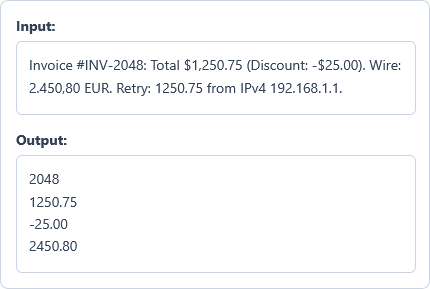
Invoice #INV-2048: Total $1,250.75 (Discount: -$25.00). Wire: 2.450,80 EUR. Retry: 1250.75 from IPv4 192.168.1.1.
Options used: Format: Auto-Detect (Dot & Comma) | Include Decimals: ON | Include Negative (-): ON | Normalize (1234.56): ON | Remove Duplicates: ON | Sort: None (Appearance Order) | Separator: New Line | Min: OFF | Max: OFF
Example Output
2048
1250.75
-25.00
2450.80
The tool extracts four unique numbers, normalizes dot and comma formats, deduplicates 1250.75, and skips the IPv4 address.
Frequently Asked Questions
How does this tool handle both dot-decimal (1,234.56) and comma-decimal (1.234,56) formats?
In auto-detect mode, the parser inspects thousand groupings and decimal separators to recognize both notations automatically. You can also switch the format menu to dot-decimal or comma-decimal mode for strict regional parsing.
Does the extractor skip IPv4 addresses and software version numbers?
Yes, the number parser automatically skips multi-dot IPv4 addresses like 192.168.1.1 and version strings like v2.4.1. This keeps technical identifiers out of your results when you extract financial figures or log metrics.
How does the tool distinguish negative numbers from hyphens in invoice codes or dates?
The parser checks the character before each minus sign and supports negative currency values like -$25.00. If a letter or digit precedes the hyphen, such as in #INV-2048, it extracts 2048 as positive.
What is the difference between auto-detect and digits-only (0-9) modes?
Auto-detect mode parses complete numeric values, including decimal fractions, thousand separators, and leading negative signs. Digits-only mode ignores signs and punctuation to extract every continuous sequence of raw digits from 0 to 9.
How do normalization and duplicate removal handle equivalent numbers like 1,250.50 and 1250.5?
Normalization strips thousand separators and converts decimal commas into standard dots so numbers share a uniform format. When you remove duplicates, the tool compares exact numeric values so 1,250.50 and 1250.5 count as one.
Are my financial logs or extracted numbers sent to any external server?
No, our client-side JavaScript engine parses, normalizes, and filters all numbers directly inside your browser RAM. Your financial records, server logs, and extracted number lists never leave your device or get stored.