URL Extractor - Extract Web Links from Text and Code
Extract web URLs from raw text, HTML code, and Markdown with query string stripping and domain filtering.
🔒 Data Safety: We process everything securely and never store or share it.
How to Use
- Paste or type your raw text, HTML code, or Markdown into the input box above.
- Configure duplicate removal, sorting, query stripping, separator, or domain filtering in the options below.
- Review the extracted URL count and copy or download your clean list from the output box.
Options Explained
- Remove Duplicates: Keeps unique URLs by matching schemes and domains case-insensitively while preserving case-sensitive paths and query strings.
- Sort Alphabetically: Orders your extracted URL list from A to Z using natural numeric and case-insensitive sorting.
- Strip Query & Hash: Strips query strings and hash fragments before deduplicating so identical base URLs merge cleanly.
- Separator: Formats your extracted URLs using a new line, comma, or semicolon for spreadsheets and scripts.
- Filter Domain: Extracts only URLs matching your target domain or its subdomains, including internationalized domain names.
Key Features
- Extract HTTP, HTTPS, FTP, SFTP, WebSocket, and www links from raw text, HTML code, and Markdown.
- Keep balanced parentheses inside Wikipedia URLs intact while stripping closing Markdown brackets and trailing punctuation.
- Decode HTML ampersand entities inside query strings automatically and skip mailto links or email domains.
- Strip URL query parameters and hash fragments before deduplicating to merge links sharing a base path.
- Support internationalized domain names, Punycode, and Unicode paths with real-time domain and subdomain filtering.
- Format extracted link lists with newline, comma, or semicolon separators directly in your browser memory.
About This Online URL Extractor
The URL extractor is a browser-based utility that pulls valid web links from text, HTML, and Markdown. It balances nested parentheses, decodes HTML query entities, strips tracking parameters, and filters links by domain locally.
Developed and maintained by the PU Tools team, this tool gives you fast, accurate, safe, and easy results in just a few clicks.
Common Use Cases
- SEO Audits: Collect outbound links, anchor targets, and resource URLs from page source code for link analysis.
- Marketing Cleanup: Strip tracking query strings and hash fragments from campaign URLs to consolidate clean canonical link lists.
- Documentation Review: Pull reference URLs from Markdown docs, server logs, or chat messages and filter by target domain.
Example Input and Output
Example Input
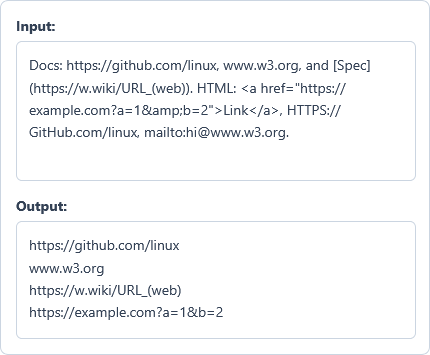
Docs: https://github.com/linux, www.w3.org, and [Spec](https://w.wiki/URL_(web)). HTML: <a href="https://example.com?a=1&b=2">Link</a>, HTTPS://GitHub.com/linux, mailto:hi@www.w3.org.
Options used: Remove Duplicates: ON | Sort Alphabetically: OFF | Strip Query & Hash: OFF | Separator: New Line | Filter Domain: OFF
Example Output
https://github.com/linux
www.w3.org
https://w.wiki/URL_(web)
https://example.com?a=1&b=2
The tool extracts four unique URLs, keeps inner parentheses intact, decodes HTML entities, and skips the email.
Frequently Asked Questions
How does this tool handle Markdown links and Wikipedia URLs with parentheses?
Our balanced bracket parser counts opening and closing parentheses to keep inner URL brackets intact. This preserves valid links like Wikipedia URLs while stripping closing Markdown brackets and trailing punctuation.
What does the Strip Query & Hash option do during URL extraction?
It removes query parameters starting with ? and hash fragments starting with # from every URL. Because stripping happens before deduplication, multiple tracking links sharing the same base path merge into one.
Does removing duplicate URLs change uppercase letters inside case-sensitive URL paths?
No, the deduplicator compares only the protocol and domain name without case sensitivity. It preserves exact uppercase and lowercase characters inside the URL path, query string, and hash fragment.
Does the extractor decode HTML entities and ignore email addresses with www?
Yes, the tool automatically converts HTML & entities into standard & symbols inside query strings. It also checks character boundaries to skip mailto links and email addresses like user@www.example.com.
Can I extract and filter internationalized domain names and subdomains?
Yes, the extractor supports Unicode domain names, Punycode xn-- labels, and multilingual URL paths. Entering a root domain into Filter Domain matches both that exact domain and all its subdomains.
Are my extracted URLs or HTML source code sent to any server?
No, all link extraction, cleaning, and domain filtering happen locally inside your web browser memory. Your raw text, source code, and extracted URL lists never leave your device or get stored.