URL Decoder - Decode Percent-Encoded URLs to Text
Decode percent-encoded URLs, query strings, and UTF-8 text while converting plus signs and nested %XX sequences.
To decode a multi-line list of URLs, switch to our Bulk URL Decoder for row-by-row output.
🔒 Data Safety: We process everything securely and never store or share it.
How to Use
- Paste your percent-encoded URL or query string into the input box above, or click "Sample".
- Toggle Decode + as Space, Recursive Decode, or Strict Mode in the options below the box.
- Click the "Decode" button to convert all percent-encoded sequences into readable UTF-8 plain text.
- Use "Copy" or "Download" above the output box to save your decoded text result.
Options Explained
- Decode + as Space: Converts plus signs into spaces first so %2B decodes as + (enabled by default).
- Recursive Decode: Unescapes double-encoded or multi-layered %XX strings repeatedly (up to 10 passes) until plain text is restored.
- Strict Mode: Requires valid RFC 3986 %XX pairs and UTF-8 bytes, rejecting raw %, %uXXXX, and control characters.
Key Features
- Decode standard RFC 3986 %XX hexadecimal sequences back into readable plain text and symbols.
- Convert form-encoded plus signs (+) into spaces first while keeping %2B as a literal +.
- Unescape double-encoded OAuth callbacks and redirect URLs across up to 10 recursive decoding passes.
- Keep standalone % symbols intact and decode legacy %uXXXX Unicode tokens in tolerant mode.
- Restore multi-byte UTF-8 sequences for accented letters, CJK characters, Arabic, Cyrillic, and emojis.
- Process all URL decoding inside your local browser memory with zero server data storage.
About This Online URL Decoder
Our URL decoder restores RFC 3986 percent-encoded links and query strings into readable UTF-8 text. It converts form plus signs into spaces, unescapes nested %XX layers, and validates byte sequences.
Developed and maintained by the PU Tools team, this tool gives you fast, accurate, safe, and easy results in just a few clicks.
Common Use Cases
- OAuth and Redirect Debugging: Unescape nested return_to, redirect_uri, and state parameters inside authentication URLs to inspect target addresses.
- Query String Inspection: Convert form-encoded search terms, filter values, and UTF-8 query parameters back into readable plain text.
- Web Server Log Analysis: Decode raw HTTP request URIs, referrer links, and encoded paths from access logs locally.
Example Input and Output
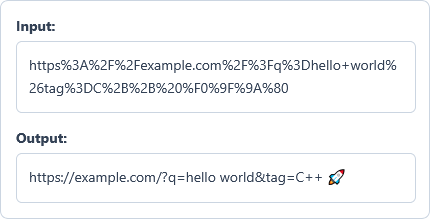
Example Input
https%3A%2F%2Fexample.com%2F%3Fq%3Dhello+world%26tag%3DC%2B%2B%20%F0%9F%9A%80
Options used: Decode + as Space: ON | Recursive Decode: OFF | Strict Mode: OFF
Example Output
https://example.com/?q=hello world&tag=C++ 🚀
The decoder converts + into spaces, keeps %2B as +, and restores UTF-8 characters and emojis.
Frequently Asked Questions
How does this single URL decoder handle a URL split across multiple lines?
It removes line breaks to merge wrapped URL lines into one continuous string before decoding. To decode a list of separate URLs row by row, use our Bulk URL Decoder.
How does the Decode + as Space option handle raw + versus %2B sequences?
When enabled, the decoder converts raw + characters into spaces before unescaping hex sequences. It then decodes %2B into a literal + symbol so terms like C++ stay intact.
When should I enable Recursive Decode for nested or double-encoded URLs?
Enable Recursive Decode when a redirect link or OAuth callback was encoded multiple times. The tool repeats decoding for up to 10 passes until no %XX sequences remain.
What is the difference between Strict Mode and default tolerant URL decoding?
Strict Mode requires valid RFC 3986 %XX pairs and UTF-8 bytes while blocking control characters. Default tolerant mode keeps standalone % signs intact and decodes legacy %uXXXX Unicode sequences.
How does the decoder restore multi-byte UTF-8 characters and emojis like %F0%9F%9A%80?
It groups consecutive %XX hex bytes and decodes them as complete UTF-8 character sequences. This restores accented letters, CJK scripts, Arabic text, and 4-byte emojis without garbled output.
Are my encoded URLs, query parameters, or tokens sent to any external server?
No, every decoding step runs locally inside your browser memory using JavaScript. Your URLs, query strings, and decoded text never leave your device or get stored.
What happens if I click the Decode button when the input box is empty?
The tool accepts an empty string as valid input and returns an empty output box.