MD5 Hash Generator - Convert Plain Text to MD5
Compute a single 128-bit MD5 hash from plain UTF-8 text and multi-line strings with uppercase and newline options.
If you need a separate MD5 hash for each line, try our Bulk MD5 Hash Generator.
🔒 Data Safety: We process everything securely and never store or share it.
How to Use
- Paste your plain or multi-line text into the input box above, or click "Sample" to test.
- Adjust the uppercase toggle or line ending mode below the input box to match your target system.
- Click "Hash" to compute a single 32-character MD5 digest for your entire text input.
- Copy the 32-character MD5 hash or download it using the buttons above the result box.
Options Explained
- Uppercase (A-F): Format the 32-character hexadecimal MD5 digest in capital letters (A-F) instead of default lowercase (a-f).
- Line Endings: Convert multi-line breaks to LF (\n) for Unix, Linux, and macOS or CRLF (\r\n) for Windows before hashing.
Key Features
- Compute a standard 128-bit (32-character hexadecimal) MD5 digest according to RFC 1321 specifications.
- Hash single-line strings, multi-line text blocks, and empty inputs (d41d8cd98f00b204e9800998ecf8427e) into one digest.
- Switch output formatting between lowercase (a-f) and uppercase (A-F) hexadecimal characters with one click.
- Normalize multi-line text to LF (\n) or CRLF (\r\n) line breaks for cross-platform checksum matching.
- Encode accented characters, CJK, Arabic, Cyrillic scripts, and emojis accurately using UTF-8 byte arrays.
- Execute all 64-step MD5 compression rounds inside browser memory without sending text to any server.
About This Online MD5 Hash Generator
This MD5 hash generator computes a 128-bit RFC 1321 digest from plain UTF-8 text and multi-line strings. It processes multi-byte characters in your browser and includes controls for uppercase formatting and LF/CRLF line endings.
Developed and maintained by the PU Tools team, this tool gives you fast, accurate, safe, and easy results in just a few clicks.
Common Use Cases
- Data Integrity and Checksum Verification: Generate a 32-character MD5 fingerprint for configuration text, scripts, or JSON payloads to detect accidental modifications.
- Database Indexing and Cache Keys: Convert long URLs, SQL query strings, or composite identifiers into fixed-length 128-bit keys for lookup tables.
- Cross-Platform Hash Debugging: Compare MD5 digests across Linux (LF) and Windows (CRLF) environments or test RFC 1321 vectors locally.
Example Input and Output
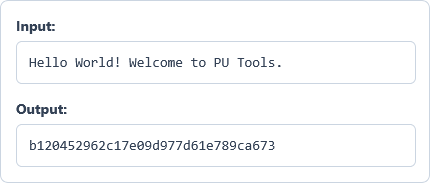
Example Input
Hello World! Welcome to PU Tools.
Options used: Uppercase (A-F): OFF | Line Endings: LF (\n) - Unix/Web
Example Output
b120452962c17e09d977d61e789ca673
The generator computes the 128-bit MD5 digest of the UTF-8 text string in lowercase hexadecimal format.
Frequently Asked Questions
How does this tool differ from the Bulk MD5 Hash Generator?
This tool combines your entire multi-line input and its line breaks into one 32-character MD5 hash. The Bulk MD5 Hash Generator instead processes lists line by line and outputs one hash per row.
Why do LF and CRLF line endings produce different MD5 hashes?
MD5 processes every raw byte in your text, so any byte change produces a completely different hash. Unix systems use LF (\n, 1 byte) while Windows uses CRLF (\r\n, 2 bytes) for line breaks.
Can an MD5 hash be reversed or decrypted back to plain text?
No, MD5 is a one-way cryptographic hash function rather than an encryption cipher. Because 64 rounds compress any text into 128 bits, you cannot reverse the digest back to plain text.
What happens when I hash an empty text input?
Hashing an empty zero-byte string is valid under RFC 1321 and produces the constant digest d41d8cd98f00b204e9800998ecf8427e.
How does this generator handle non-Latin characters and emojis?
The tool converts your string into a UTF-8 byte array before running the 64-step MD5 algorithm. Multi-byte characters such as accented letters, CJK, Arabic, and emojis always match standard command-line md5sum outputs.
Is MD5 suitable for checksum verification or password hashing?
MD5 is designed for fast data integrity checks, checksum verification, and non-cryptographic database indexing. Because MD5 is vulnerable to collision attacks, security standards recommend Bcrypt, Argon2, or SHA-256 for sensitive credentials.
Is my input text ever stored or sent to a remote server?
No, your browser computes the 128-bit MD5 digest directly inside local memory on your device. Neither your source text nor the resulting 32-character hash ever leaves your computer.