SHA1 Hash Generator - Create 160-Bit SHA1 Hashes
Generate a 40-character (160-bit) SHA1 digest from plain UTF-8 or multi-line text using uppercase and newline controls.
To hash multiple text lines into separate row-by-row SHA1 digests, switch to our Bulk SHA1 Hash Generator.
🔒 Data Safety: We process everything securely and never store or share it.
How to Use
- Type or paste your raw text into the box above, or press "Sample" to insert test data.
- Choose your preferred hexadecimal case and line break format from the options below the text box.
- Press the "Hash" button to calculate a 40-character (160-bit) SHA1 checksum from your input.
- Copy the resulting SHA1 digest to your clipboard or download it using the buttons above the output.
Options Explained
- Uppercase (A-F): Display the 40-character SHA1 hex string in uppercase letters (A-F) rather than standard lowercase (a-f) output.
- Line Endings: Normalize line breaks to LF (\n) for Unix/Git or CRLF (\r\n) for Windows before SHA1 hashing.
Key Features
- Calculate a 160-bit (40-character hexadecimal) SHA1 message digest compliant with FIPS PUB 180-4 and RFC 3174.
- Process single-line strings, multi-line text, or zero-byte empty input (da39a3ee5e6b4b0d3255bfef95601890afd80709) into a single SHA1 checksum.
- Toggle the 40-character hexadecimal output between lowercase (a-f) and uppercase (A-F) notation automatically.
- Standardize line breaks to LF (\n) for Unix/Git or CRLF (\r\n) for Windows to ensure consistent hashes.
- Encode multi-byte Unicode text, accented letters, non-Latin scripts, and emojis into UTF-8 bytes prior to hashing.
- Perform all 80 Big-Endian SHA1 compression rounds locally in browser memory with zero server data storage.
About This Online SHA1 Hash Generator
The SHA1 hash generator calculates a 160-bit (40-character) digest from UTF-8 text following FIPS 180-4 and RFC 3174. It runs all 80 compression rounds in your browser with uppercase hex and LF/CRLF newline controls.
Developed and maintained by the PU Tools team, this tool gives you fast, accurate, safe, and easy results in just a few clicks.
Common Use Cases
- Git Object and Revision Auditing: Verify 40-character SHA1 identifiers generated from multi-line UTF-8 text across LF (\n) and CRLF (\r\n) systems.
- Payload Integrity and Checksum Auditing: Produce a 160-bit SHA1 checksum for API responses, configuration strings, or source code snippets to detect changes.
- Legacy Protocol and RFC 3174 Testing: Validate FIPS 180-4 test vectors, WebSocket handshake tokens, or OAuth 1.0 signature base strings during debugging.
Example Input and Output
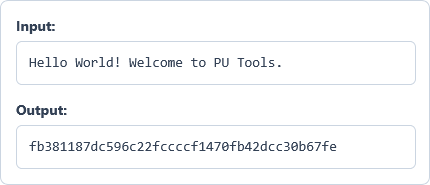
Example Input
Hello World! Welcome to PU Tools.
Options used: Uppercase (A-F): OFF | Line Endings: LF (\n) - Unix/Web
Example Output
fb381187dc596c22fccccf1470fb42dcc30b67fe
The tool calculates a 40-character (160-bit) SHA1 checksum from the UTF-8 string using default lowercase hex.
Frequently Asked Questions
When should I use this tool instead of the Bulk SHA1 Hash Generator?
Use this generator when you want a single 40-character SHA1 checksum for your entire text block. If you need separate SHA1 digests for each row in a list, use the Bulk SHA1 Hash Generator.
Why does switching between LF and CRLF change the SHA1 output?
Changing the line break mode alters the underlying byte sequence fed into the 80-round SHA1 compression function. Unix and Git systems represent newlines with one byte (LF, \n), whereas Windows uses two bytes (CRLF, \r\n).
What is the technical difference between SHA1 and MD5 hashes?
SHA1 generates a 160-bit (40-character hex) digest using 80 Big-Endian rounds, while MD5 outputs a 128-bit (32-character) hash. Although both serve legacy checksums and Git object IDs, modern security applications should use SHA-256 or Argon2.
What SHA1 hash is produced for an empty string?
An empty zero-byte string always produces the standard FIPS 180-4 SHA1 digest da39a3ee5e6b4b0d3255bfef95601890afd80709. You can verify this test vector by clearing the input box and clicking the "Hash" button.
Is it possible to decrypt a 40-character SHA1 hash back into text?
No, SHA1 is a one-way cryptographic digest function defined in RFC 3174 rather than reversible encryption. Because arbitrary input bytes are compressed into five 32-bit state words, original strings cannot be mathematically recovered.
How are Unicode characters and emojis encoded before SHA1 hashing?
All input text is encoded into a UTF-8 byte array before entering the 512-bit SHA1 message block buffer. This guarantees identical SHA1 checksums for accented letters, non-Latin scripts, and emojis across command-line and web environments.
Are my input strings or SHA1 digests transmitted to any external server?
No, the entire 80-round SHA1 calculation executes inside your browser memory using client-side JavaScript. Your plain text and generated 40-character hashes remain on your device and are never stored or shared.